






















Update on Eizo CG303W 30" professional display

In my Jan 12 entry, I reported on the mouse-jump problem I was experiencing with the Eizo CG303W 30" professional display.
Eizo contacted me today with something to try, and I am pleased to report that the mouse-jump problem has gone away. Here are the instructions I used.
1. Connect the monitor using the Dual Link cable into the monitor Input 1.
2. Turn off the monitor using the front power key (Far right).
3. Hold down the "Signal 1-2" key (Far left) and press the power key at the same time which will bring up the Display setup option below.
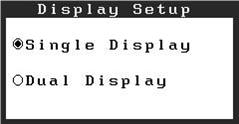
4. Select Single Display and press the Enter key which will bring up the signal selection option below.
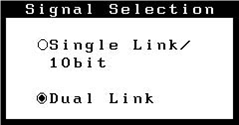
5. Select Dual Link using the up/down keys and press Enter.
6. Start your system and you should see the difference.
The Single Display / Dual Display means that two input signals can be displayed as if the CG303W were two displays. I don't have any use for this feature, and probably never will, but some people might, I suppose.
One thing I'm not clear on (I've inquired) is whether selecting Dual Link above then makes the display capable of 8-bits only; while Apple drivers still aren't in Mac OS X 10.6.6 to support 10-bit, when that day arrives it would be an ugly choice between a mouse-jump problem and 8/10 bit.
