






Color rendition in browsers

Update: reader René D pointed me to this page, which discusses a bug in Firefox 3.5.x. Reader Fábio P suggests that using a full path to the monitor profile for gfx.color_management.display_profile (in about:config) might help, and also points me at this thread. Of course having to reconfigure FF every time I calibrate my monitor is a nuisance (I include a date in each profile). Anyway, here’s how to fix Firefox 3.5.x, it worked for me.
However, the full path to the profile works! Here is how to fix color management in Firefox 3.5.x.
...
It’s a very confusing situation with browser display of color. Bottom line is that I have no idea what my readers are seeing on their own systems. I do include a color profile with all the images I post, and 99% of them are in sRGB color space.
I can say only the following with certainty at this point, based on my own testing with Apple Safari 4.0.4 and Firefox 3.5.6 on Mac OS X 10.6.2:
- Safari 4.0.4 (Mac or PC) is the only browser that closely matches what I see in Adobe Photoshop CS4. There are subtle differences, perhaps due to a rendering intent difference, but images match closely what I see in Photoshop.
- On my Mac Pro with a NEC 30" calibrated and profiled display, Firefox 3.5.6 does not display even sRGB images correctly. I’ve trashed its preferences (~/Library/Application Support/Firefox/Profiles), tried plugins such as ColorManagement 0.5.1, set gfx.color_management.mode=1 in about:config, no luck. Firefox display of images is way off, a complete mismatch for Photoshop CS4.
- On my other Mac Pro with an Apple 30" display and an Apple-generated display profile, Firefox does display the image properly. I suspect that Firefox cannot handle my monitor profile, even though it is a version 2.1.0 profile (generated by NEC Spectra View II software).
Several readers have written (thank you), stating that either or both Firefox solutions mentioned above work for them, but I’m sorry to say that neither solution works for me, and this is obvious on my calibrated and profiled NEC 30" monitor. As a side note, ordinary monitors simply cannot display much of the wide gamut I regularly see in Nikon images, so perhaps that is a factor also.
The images below are from a screen shot of both browsers side-by-side. Both images will still look wrong in Firefox, and oddly it doesn’t even display this image correctly, though it is in sRGB. Maybe it just can’t handle my monitor profile (v2.1). it does display this image correctly on my other Mac Pro, but that one has an Apple 30" display with its own Apple-generated profile. Another mystery.
Bottom line: The best choice for getting accurate color in your browser is Apple Safari 4.
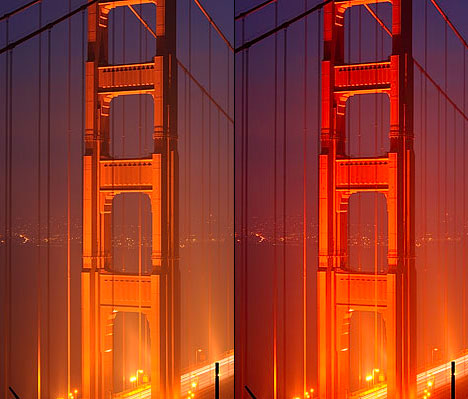
(that’s assuming your monitor can display these colors)
Image is in sRGB, taken from screen shot from Safari (left) and Firefox (right)