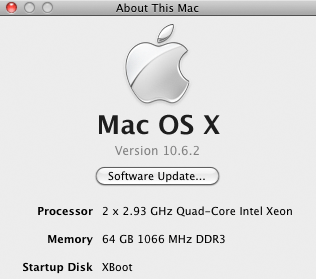




















64GB memory in 8-core Mac Pro! (tested!)

The OWC 8GB modules are working flawlessly in both an 8-core Mac Pro and a quad-core Mac Pro (see review of Mac Pro Nehalem). See yesterday’s discussion.
Shown below is for my 8-core Mac pro with 64GB in it. With 64GB, the Mac can boot into 32-bit kernel, but only 32GB will actually be available. Booting into the 64-bit Mac OS X Snow Leopard kernel allows all 64GB to be used. I have been using the 64-bit kernel for six weeks now, with zero problems. It is definitely perkier with the 64-bit kernel, so give it a try if your system doesn’t have something holding it back, like special hardware lacking a 64-bit driver.
A full report will follow in MPG, but I see no problems whatsoever so far with 24GB or 32GB in a quad-core Mac Pro Nehalem or 64GB in an 8-core 2.93GHz model. And that’s running Memory Tester for a while — so far rock solid. A more thorough test will “prove out” the modules, something any serious user should do when installing memory.