





















Aperture’s “database”

A lot of angst has been poured out and into various online forums about Apple’s Aperture, and how it ingests files into its database. However, it’s actually not true that these files are in a database, at least not a conventional one. You are not “stuck” with your files in Aperture’s library.
The original files still exist as standalone files in the file system, and can be copied and accessed and double-clicked just like any other files...sort of.
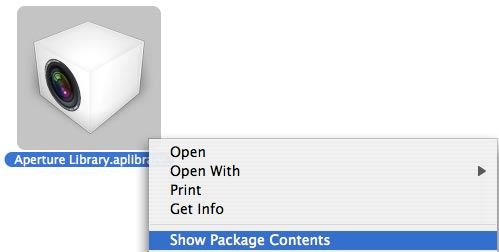
Aperture marks its library as a “package” (a MacOS X concept). This causes the MacOS X Finder to display it as if it were a single file. However, the contents are actually just ordinary files and folders and can be displayed using “”:
| Show Package Contents on an Aperture Library |
 |
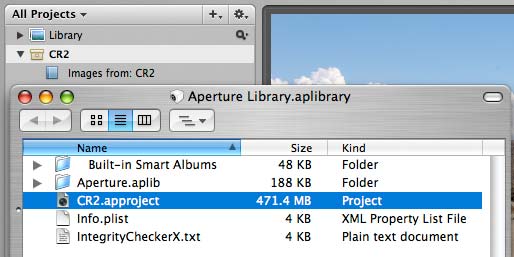
The resulting window “” is shown below overlaid on top of Aperture’s own window. You can see an Aperture “project” named “” in the Aperture window below it. Thus, each project is actually a folder on disk.
 |
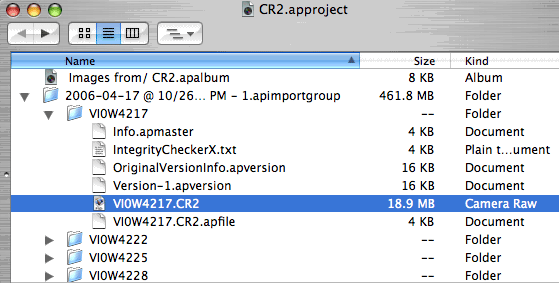
Using the command one more time on “” results in the window shown below. Each RAW file is stored within a folder of the same name, along with various other Aperture housekeeping files. You can double-click the raw file to view or edit it—try it!
| Project Contents Showing double-clickable plain 'ol RAW files |
 |
The point of all this is that you are not somehow “stuck” forever with your original raw files in a database from which special tools are required to extract the raw files.
While its true that all the settings, keywords and metadata are stored separately from the original files (hence the non-destructive editing approach), you always have access to the original raw files.
Aperture also keeps the metadata in XML files, so the fear of losing one’s hard work should Apple or Aperture go “belly up” are unfounded, because XML is today’s lingua franca of the internet, and it is nothing more difficult than structured text, not obscure binary bits.
Still need convincing? If you’re a command-line geek, take a look at the listing, which reveals the file and folder structure as it truly exists on disk, along with the XML files and their content for each raw file.
