






















Purchasing a new MacBook Pro? Laptop hard-drive speed.

Related: diglloydTools, DiskTester, hard drive, laptop, MacBook, MacBook Pro
If you’re purchasing a new MacBook Pro, bear in mind that the achilles heel of laptop performance is slow hard disk speeds. You’re almost certainly better off getting a 7200 RPM hard drive (versus 5400 RPM) than a slightly faster processor speed. Here are numbers taken from a DiskTester run on my PowerBook G4 1.33 GHz 17" laptop with its 80GB hard drive (5400 RPM):
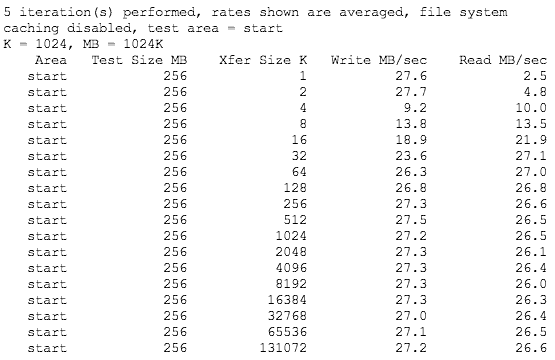
Write speeds are faster because of caching. The dip in write speed from 4K to 32K is due to inadequate drive cache (this is typical, even on desktop drives). Those numbers are the best possible—the inner tracks are usually only 50% of the speed of the outer tracks on most hard drives (a fixed linear bit density in a smaller diameter). Here is DiskTester’s report for an “area test” which measures speed across the drive:
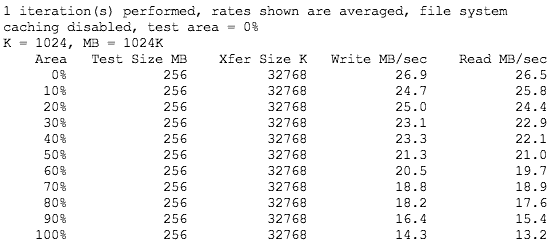
Note the dramatic drop in speed as the drive fills up! There are two ways to mitigate this:
(1) Buy a higher capacity hard drive, and avoid filling up the drive so that most data resides in the faster areas of the drive. (Mac OS X uses the faster areas first when you format a new drive). You can also partition the drive, reserving the slower partition for less frequently used items.
(2) Buy a hard drive that is faster to begin with. On RPM alone a 7200 RPM drive should be 33% faster than a 5400 RPM drive (and it might also have a large cache).
The new MacBook Pro models use internal Serial ATA (SATA) drives. While these almost certainly will perform better than older ATA drives, the same factors hold sway: a much faster dual-core processor, but only marginally faster hard disk speed means that anything involving disk use is going to run s...l...o...w...l...y. If you’re a photographer dumping multiple gigabytes of image files onto a laptop hard drive, save yourself the migraine and spend the extra $100 or so on a 7200 RPM hard drive.
